Make your catalog configurable in 3D
Your products, materials, rules, constraints and prices live in one dashboard. Publish a link and customers are configuring and pricing the same day, with every rule, constraint and price applied on each click. Embed it on your site, or mount it with the SDK when you want full control. Free to build.Products, rules, constraints and prices in one dashboard. Publish a link, embed it, or use the SDK. Free to build.
GitHub npm For brands: no-code guide Launch post: introducing the platform →

Three ways to go live
Share a link today. Embed it on your site. Build it in when you are ready.
All three run the same configurator against the same catalog, so nothing is rebuilt when you move from one to the next.
Share a link No code
For brands, no code
- Build the catalog, rules, constraints and prices in the dashboard, then create a shareable link for the system.
- Send it to customers, put it behind a button, add it to quotes. Switch it off any time.
Embed it on your website iframe
For any website
- Paste one tag into any page. The same link runs inside your site, in your branding.
- Add your website to the link's allowed domains in the dashboard, and it is live.
- Works on any platform that lets you add HTML, with nothing to install.
<iframe
  src="YOUR_LINK"
  width="100%" height="720"
  style="border:0"
  allow="fullscreen;
         xr-spatial-tracking">
</iframe>
Build it into your own code SDK
For developers
- Install the SDK and mount the same configurator into any page with one call.
- Restyle or replace any part of the interface. Add your own buttons, 3D and checkout.
- Listen to every event and save projects, quotes and renders into your own systems.
For brands
Sell configurable products without the enterprise complexity.
Furniture, kitchens, modular storage, manufacturing: if it comes in options, it can be configured, priced and quoted here, and you do not need a developer to start.
See it, price it, keep it
Configure in 3D, see a live itemised price, save projects, and view the exact piece in AR on their phone.
Quotes that match the build
Branded quote PDFs, dealer and marketplace channels with their own prices. No more mis-quoted orders.
One dashboard, every channel
Products, materials, rules and prices in one place. Publish a new catalog version and every channel updates.
Typical setup: catalog in the dashboard this week, link live the same day.
Start nowFor developers
One call on your side. Everything else is the engine’s job.
None of this is code you write. mount() loads the system, sends each shopper action to the engine and draws what comes back. Rules, constraints and pricing are all computed on the server, so a shared link, an embed and an SDK page give the same result for the same clicks.
# npm install @imagineio/configurator-sdk

import { mount } from "@imagineio/configurator-sdk";

// Your server swaps the API key for a 30-minute session token.
// The SDK calls this route again before expiry, and once on a 401.
const app = mount("#root", {
  systemId: 90,
  getToken: async () => (await fetch("/configurator-token", { method: "POST" })).json(),
});

// That is the whole integration. Later: app.unmount();
Is the catalog current?
Every action carries the catalog version the page booted with. If your team published a new version mid-session, the engine answers 409 before touching anything, and the SDK refetches and retries.
The action lands
Pick an option, add or remove a module, swap a variant, load a preset. Unpicked selections are filled from their defaults, so rules always see a complete state.
Matching rules fire, in priority order
Swap every leg in a run, hide a component, narrow an option set, load a material. Effects are written as overrides on top of the base configuration. The catalog itself never changes.
Every constraint re-checks the result
Max counts, adjacency, mutual exclusion, compatibility, custom limits. Anything the result breaks is refused with a reason the shopper can read.
One response, fully resolved
Visibility, materials, component swaps, effective selections and which options remain available are baked in. The SDK diffs it against the last frame and updates the scene.
What comes back 200
The shopper's click sent one action. The pick lands in selections; everything the engine did in response (swapped components, hidden parts, re-skinned materials) lands in overrides. The catalog never changes, so you can always separate what was chosen from what the engine derived.
{
  "catalogVersion": 14,
  "resolvedState": {
    "selections": { "60": 645 },          // leg style: Beinramme (what was chosen)
    "placements": [{
      "id": "p-1", "variantId": 375,      // 1-seater, as placed
      "overrides": { "componentSlots": { "sofa_leg": 1272 } },   // what the engine did
      …
    }]
  },
  "pricing": { "grandTotal": …, "currency": … },
  "warnings": []
}
What you can rely on
- Nothing is decided in the browser. Rules, constraints and prices run on the server, so a custom interface cannot drift from the catalog.
- Rules can chain, you still get one response. An effect can trigger another rule. The engine keeps going inside the same request until nothing else matches. A cycle is rejected with a 422 that names the rules involved.
- Changes are deltas. Effects are overrides layered on the placed variant, never edits to the catalog, so undo, presets and share links stay exact.
- Pricing is itemised. Each option carries its own price change and a sales channel can override base prices. The live breakdown is the same one the quote PDF prints.
- Your team can extend the logic without you. Custom rules and constraints are authored in the dashboard as plain JSON with bounded evaluation. They run through the same pipeline and reach you as the same response.
Applied. The state updates. Any warnings ride along and the shopper can carry on.
Catalog changed. Your team published a new version while a shopper was mid-session. The SDK picks up the new version and replays the action; the shopper never notices.
Rejected. A constraint failed. The previous state stays and the shopper sees the reason, which you can restyle or replace.
The platform
Everything a configurator needs, already modelled.
You bring the 3D assets and the storefront. The platform holds the structure beneath them and keeps it consistent across every channel you sell through.
Catalog and components
Components, anchor points, groups, materials and variants, scoped to your organization or to one system.
Rules and constraints
Trigger-and-action rules plus always-enforced limits. Authored in the panel, evaluated on every action, never rebuilt client-side.
Live pricing
Prices live on the options that load each variant, so a quote follows the resolved state. Per-channel overrides for dealers.
Saved projects and quotes
Persist a shopper’s build behind a share token, attach renders, and hand back a branded quote PDF from your templates.
Sales channels and your storefront
One configurator, many storefronts. Each channel carries its own prices, defaults and theme; a message bridge lets your page drive it.
AI imagery of the exact configuration
Silo and lifestyle images of the piece the shopper built, rendered on demand. Metered per plan, stored with your other assets.
AR on the shopper's phone
An AR link and QR code for the current build. The shopper scans it and sees the exact piece, full size, in their own room.
Themes, layouts and your own components
Theme tokens, plain CSS, component overrides, slots and whole layouts. Every surface has a working default; change only what you want.
For developers · Authentication
Your key stays on your server. The browser gets a short-lived token.
Every request is scoped to your organization by the credential that made it. There is one long-lived secret, and it never ships to a page.
Server API key
- Created in the dashboard under Settings, then API Keys. Prefix
ck_. - Sent as
X-Api-Key. Read-write by default. - Fine for quick starts and server-to-server calls. Never embed it in a page.
POST /api/v1/auth/token/
X-Api-Key: ck_…

{ "scope": "session", "system_id": 90,
  "origin": "https://your-site.com" }
Browser Session token
- Minted by your server from the key. Lives 30 minutes. Sent as
Authorization: Bearer. sessionscope can save projects and upload renders.catalogscope is read and price only, for public embeds.- Optionally bound to one system and one origin, so a token lifted from your page is useless elsewhere.
201 {
  "access_token": "eyJ…",
  "token_type": "Bearer",
  "expires_in": 1800,
  "scope": "session"
}
Showcase
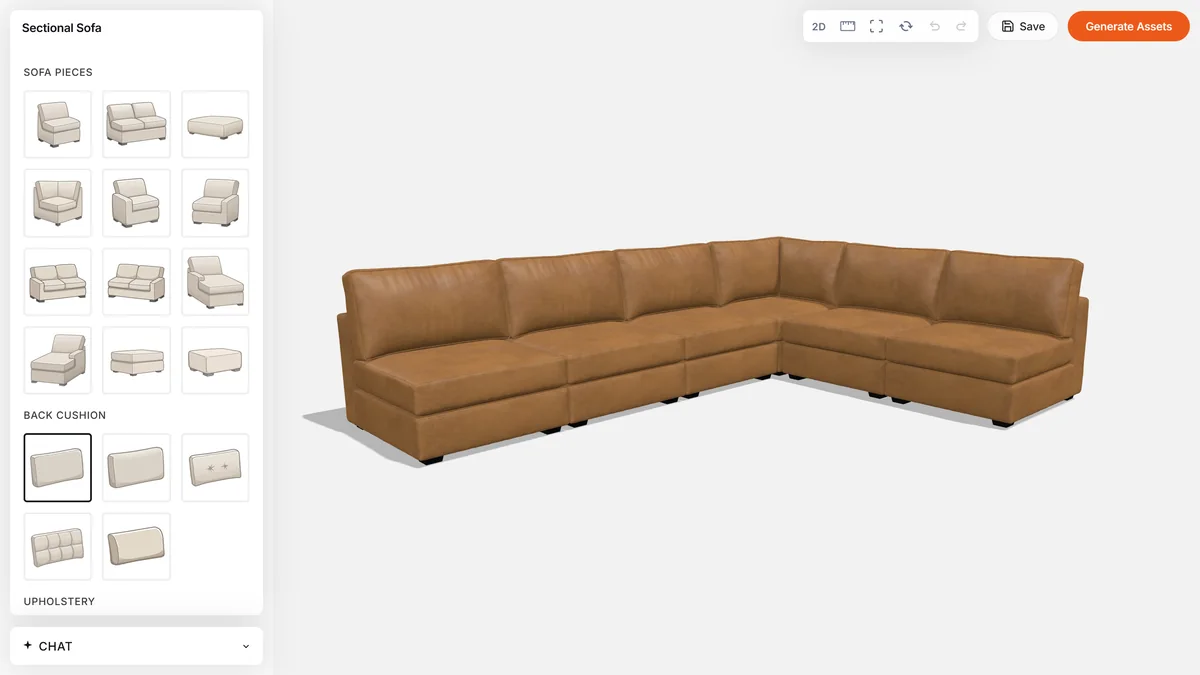
See it in two catalogs
Real configurators, live. Built on the same engine you get on the free plan.

Resources
Four places, and that is all of them.
Set the catalog up in the dashboard, then publish a link or embed it on your site. When you want full control, install the SDK from npm and build against it, or clone the sample project to have something running in minutes.
Set up products, variants, materials, options, rules and a configurable system, in the order they depend on each other. Start here whichever path you take. A finished system can be shared as a link or embedded in your site straight away, or handed to a developer.
SDK documentationEvery SDK function, plus twelve walkthroughs: theming, custom buttons and 3D, quote templates, store integration, rules and events. Each ends with a reference of what it used.
Sample projectClone and run: the SDK mounted against a real system, with the token route and a working page already in place. Sample catalogs for the sectional sofa and the kitchen included.
npm packageOne install, everything included: npm install @imagineio/configurator-sdk pulls the SDK and the exact 3D stack it is built against. Releases live here.
Getting started is free
Build the whole thing before you pay for anything.
Every organization starts on the free plan with no card and no sales call. Unlimited configurators, products, variants and materials, the full rules and pricing engine, the dashboard, API keys and your whole team.
- Everything needed to build and test a configurator end to end
- Rules, constraints, live pricing, presets and themes
- API keys, session tokens and an AI image allowance
- A commercial licence and no watermark
- Running on your own domain and storefront
- Sales channels, saved projects with quotes, higher limits
Plans and current pricing are in the dashboard, where you can upgrade whenever you are ready.
See plans and pricingFAQ
Frequently asked questions
Everything you need to know before you build your first configurator: plans, platforms, the engine and the SDK.
What is a 3D product configurator?
An interactive 3D tool, on a website or in an app, where a customer picks options (size, modules, fabric, finishes) and sees the exact product in 3D with a live price. On imagine.io the rules, constraints and pricing run on the server, so the picture and the price are always the ones the catalog allows.
What kinds of products can I configure?
Anything built from options: sofas and sectionals, chairs, beds and mattresses, kitchens and cabinetry with their appliances, doors, mirrors, frames, lighting: any product line with variants, materials and rules. One organization can hold several configurable systems, each with its own catalog, rules and prices; the sample data ships a sectional sofa and a kitchen.
Is there a free plan?
Yes. Every organization starts on the free plan with no card and no sales call: unlimited configurators, products, variants and materials, the full rules and pricing engine, the dashboard, API keys and your whole team. Going live adds a commercial licence, no watermark, sales channels, saved projects with quotes and higher limits. Plans and current pricing are in the dashboard.
What are the different ways to share the configurator?
Three, and all of them run the same catalog. Share a link: publish the system and send the link, put it behind a button on your site, or add it to a quote. Embed it: paste one iframe tag into your own website, in your branding, on any platform that lets you add HTML. Build it in: install the SDK and mount the configurator inside your own code, then deploy it as part of your site. Nothing is rebuilt when you move from one to the next, and a link can be switched off at any time.
Do I need a developer to launch a configurator?
No. Build the catalog, rules, constraints and prices in the dashboard, then create a shareable link, or paste one iframe tag into any page that lets you add HTML. The SDK is for teams that want to restyle or replace parts of the interface, or add their own buttons, 3D or checkout.
Does it work with my website platform?
Yes. Shopify, WordPress, Webflow, Squarespace, Wix and any custom site can run it, because the configurator is embedded with one iframe tag and every platform lets you add an HTML tag. Add your website to the link's allowed domains in the dashboard, paste the tag, and it is live in your branding with nothing to install. If your site is built in React, you can use the npm SDK instead for a deeper integration.
Where do the rules, constraints and pricing run?
On the server. Every change a shopper makes is sent to the engine, which applies matching rules in priority order, re-checks every constraint, prices the result and returns one fully resolved state. Nothing is decided in the browser, so a custom interface cannot drift from the catalog.
What happens if I change the catalog while someone is configuring?
Every action carries the catalog version the page loaded with. If you publish a new version mid-session, the engine answers 409 before touching anything, the SDK picks up the new version and replays the action, and the shopper never notices.
Is my API key exposed in the browser?
It must not be, and that is in your hands: keep the API key on your server and never ship it to a page. Your server exchanges it for a session token that lives 30 minutes and is sent as a Bearer header; a token can be bound to one system and one origin, so one lifted from your page is useless elsewhere.
What do I install for the SDK?
One package: npm install @imagineio/configurator-sdk, with React 18. Call mount() once and the configurator runs; the 3D stack is installed for you as peer packages. The sample project on GitHub is the same thing already wired up.
Can customers save and share what they configured?
Yes. A saved project gets a share link and a quote PDF, and an AR link opens the exact configuration at full size on a phone. Through the SDK, projects, quotes and renders can also be written into your own systems.
Can a configuration become a quote?
Yes. A saved project gets a share link and a quote PDF with the itemised price. Through the SDK you can customise the quote template or supply your own.
Can customers view it in AR?
Yes. Generate an AR link for the current configuration and put its QR code on the page or the quote. The shopper scans it with a phone and sees the exact piece they built, at full size, in their own room.
What is a sales channel?
One route you sell through: your own website, a dealer's site, a marketplace you list on such as Wayfair or Amazon, or an internal tool for your sales team. Each channel gets its own link or embed and can carry its own prices, option overrides and presets, so one catalog is sold differently per channel.
Can prices differ by channel or dealer?
Yes. Sales channels carry their own pricing and overrides, so a dealer, a marketplace and your own storefront can run the same configurator at different prices and with different options.
Get started
Your catalog can be live this week.
Create an organization, build the catalog in the dashboard and publish a link. Share it or embed it on your site the same day. When you want full control, an API key and the SDK docs are one click away.
Fair usage Founding offer for the first 50 customers: the limits, in plain numbers
Plans are not metered by catalog size: configurators, products, variants and materials stay unlimited on every plan. These are the fair-usage limits for the founding offer, and they are generous by design: a catalog of several thousand products with high-resolution textures and 3D models sits comfortably inside them. Heading past one? Talk to us and we will work out a plan that fits.