Introducing the platform
Introducing the imagine.io Configurator Platform: 3D Configuration With Product Logic Built In
Build interactive 3D product experiences with rules, constraints, validation and live pricing. Share a link, embed it on your website or customize it with the SDK.
A customer changes a finish, adds a module, or chooses a different component. The product should update in 3D, but so should everything that depends on that choice. Which options are still available? Is the combination allowed? What does it cost?
A configurator needs to answer those questions together.
Today, we’re introducing the imagine.io Configurator Platform: a platform for bringing configurable products into 3D, with a server-side engine that evaluates product rules, constraints and pricing on every change. Business teams can manage their catalog and publish a ready-made experience. Developers can integrate and customize that experience using the SDK. Both work with the same underlying product data and logic.
Bring your product catalog into 3D
The platform is built around products and the choices that make them configurable: components, variants, materials, options and the relationships between them.
That can mean a chair with different finishes, a sectional sofa assembled from modules, or a kitchen with cabinets and appliances. You can manage multiple configurable product lines within one organization, each with its own catalog, rules and prices.
Bring your 3D assets, define the available choices, and connect them to the product’s behavior. A choice can change a material, replace a component, switch a variant, or load another configuration. Customers explore those choices in an interactive 3D scene with live pricing.
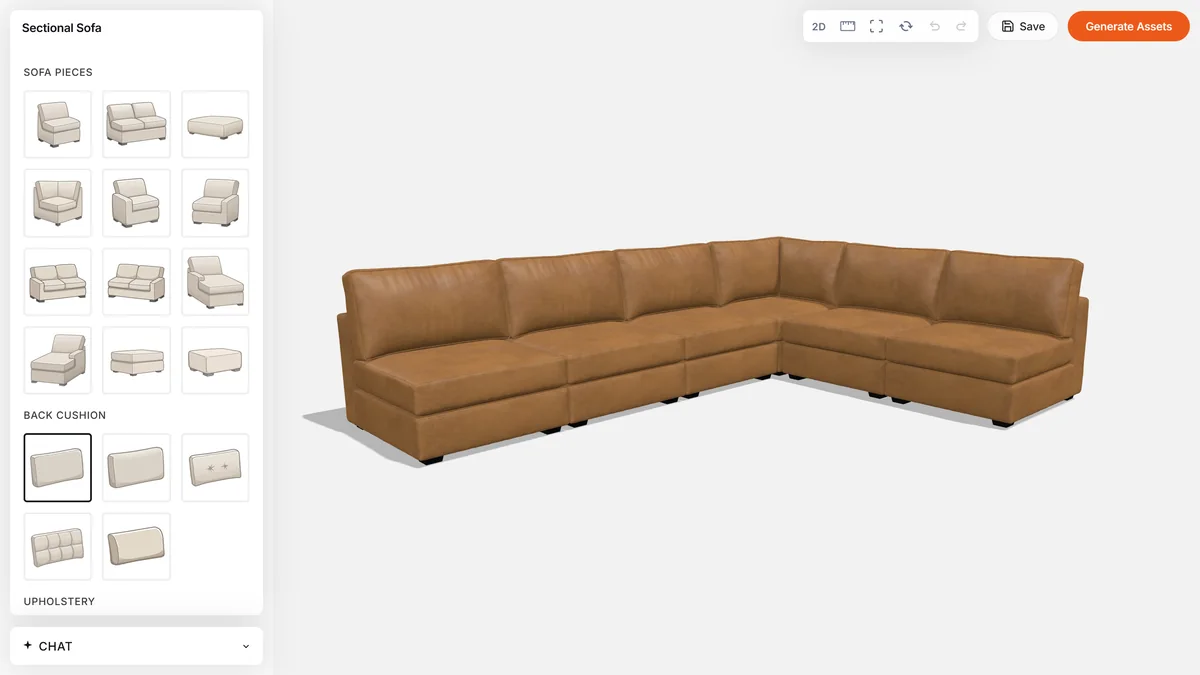
Rules and constraints: every change checked against your product logic
At the center of the platform is the rules and constraints engine.
Rules describe what should happen when a condition is met. Selecting an option might swap a component, apply a material, hide a part, or narrow the choices available elsewhere. Constraints define the limits the configuration must respect, such as maximum quantities, compatibility requirements and placement restrictions. Your team defines both in the dashboard, using built-in controls or custom JSON for more advanced logic.
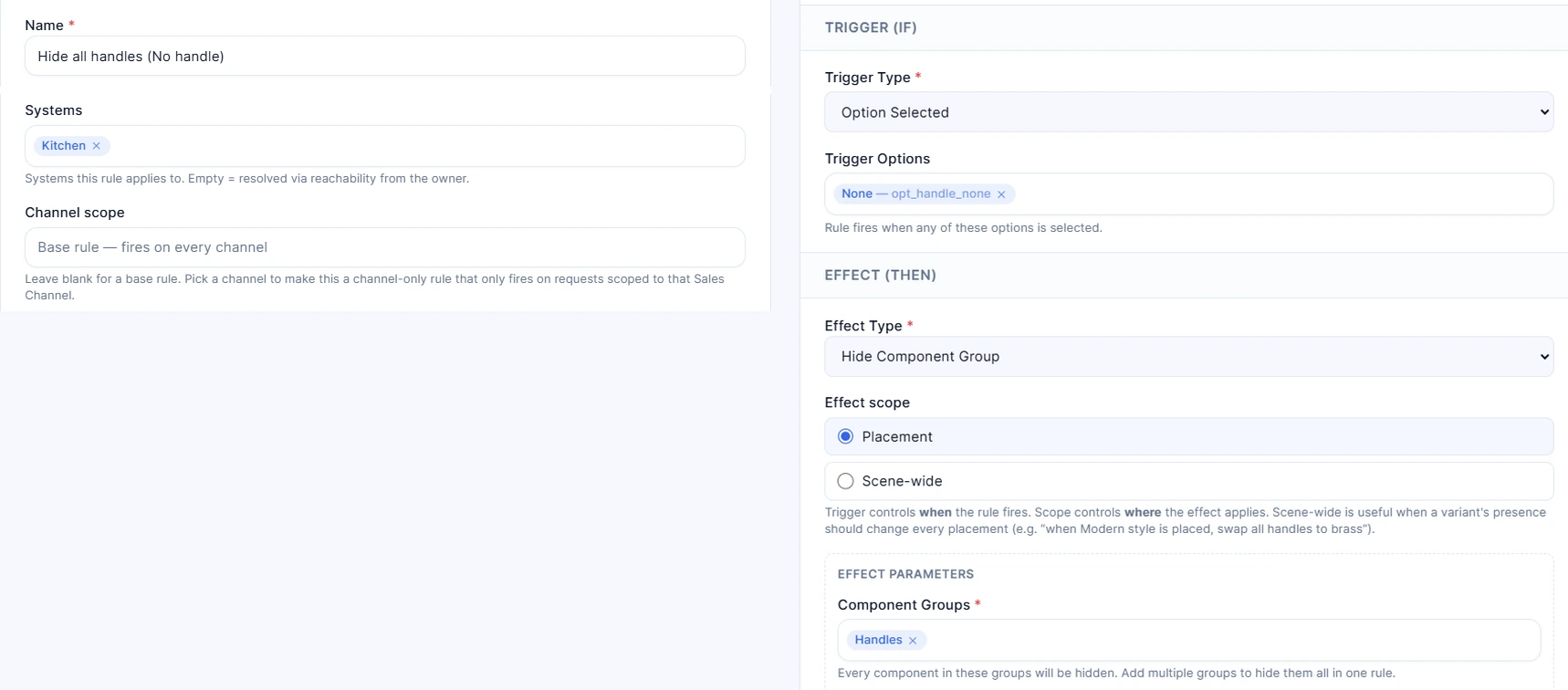
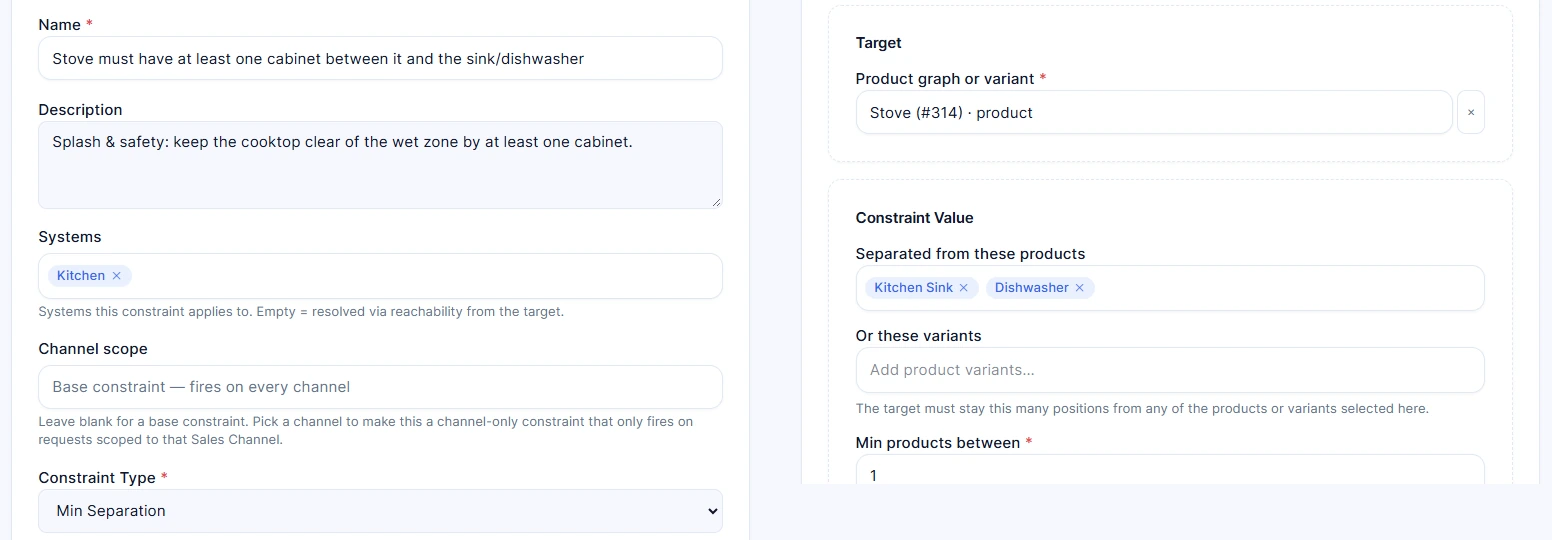
Consider a kitchen configuration. A rule for a handleless option can hide the handles on the relevant cabinets. A hard constraint can limit a cabinet run to six units. When a customer tries to add a seventh, the engine rejects the change and provides a reason. The SDK keeps the previous configuration and shows that explanation to the customer.
Each configuration change goes to the engine. The evaluator applies the matching rules, checks the resulting configuration against the defined constraints, and returns the resolved state: the components and materials to display, the options that remain available, pricing and relevant messages. The SDK uses that response to update the interface and 3D scene.
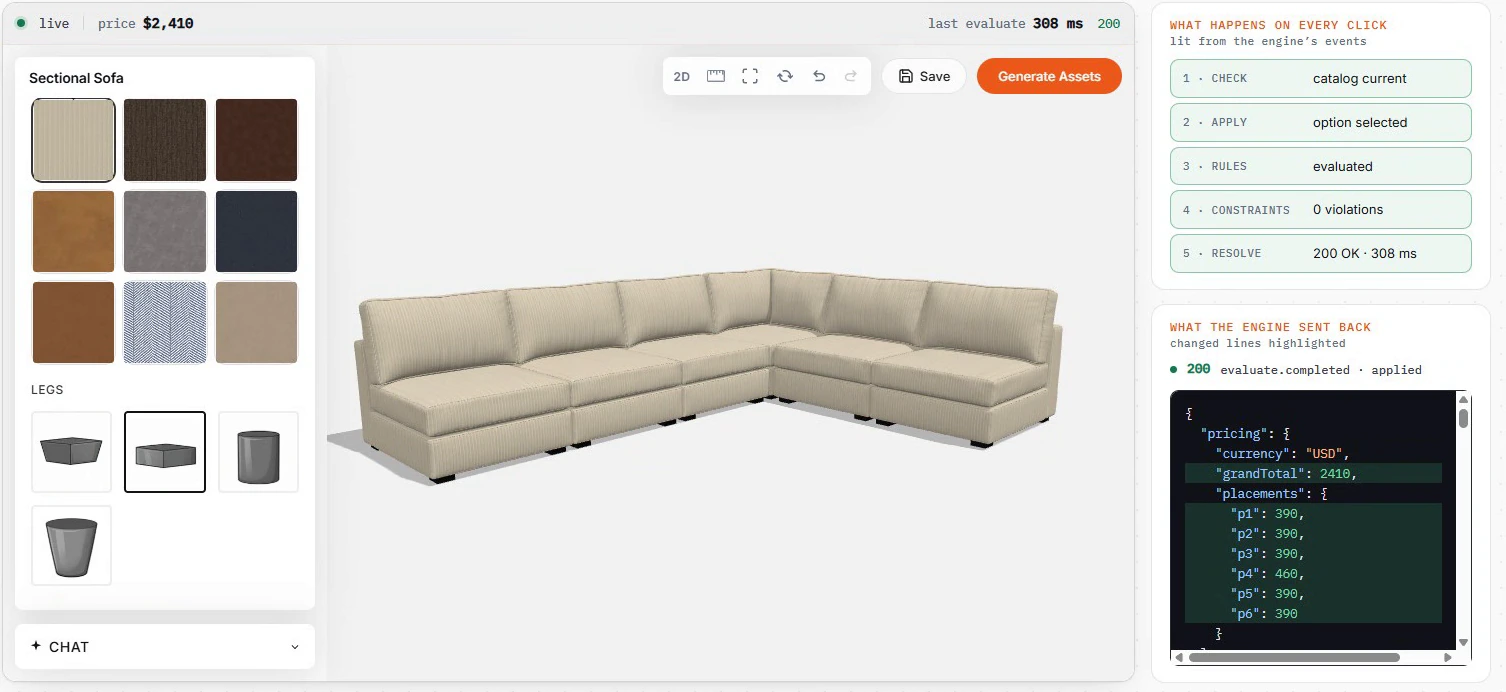
Validation happens as the customer configures, not only at the end. Constraints block invalid changes before they reach the scene.
Because this logic runs on the server, a shared configurator, an embedded experience and a custom SDK interface use the same engine to evaluate the same product choices. For a closer look at the response, read the evaluation guide.
Start without code. Customize with code.
There are three ways to put a configurator in front of customers, all using the same catalog.
Publish a shareable link
For non-developers, the dashboard is the starting point. Set up products, materials, options, rules, constraints and prices, then publish a link to the configurator. Share it with a customer, add it to a sales conversation, or place it behind a button on your website. You do not need to build a custom frontend to start using the experience.
Embed it on your website
A ready-made configurator can also run inside your website through an iframe. Add the embed to a page that supports HTML and configure the allowed domain in the dashboard. The embedded experience uses the same catalog and product logic as the shared link, with no SDK installation required on the host page. See the embed guide.
Build with the SDK
For developers, the React SDK provides a working configurator that can be restyled, extended, or integrated into a custom application. Use theme tokens and CSS for branding. Replace individual interface components, add buttons and panels, or create a different layout. For a fully custom interface, hooks expose options, availability, pricing and actions.
Once your catalog and application are configured using the SDK quickstart, mounting the experience looks like this:
import { mount } from '@imagineio/configurator-sdk';

const app = mount('#root', {
  systemId: 12, // Replace with your configurable system's ID.
  getToken: async () => {
    const response = await fetch('/configurator-token', {
      method: 'POST',
    });
    if (!response.ok) {
      throw new Error('Unable to start a configurator session.');
    }
    return response.json();
  },
});
Your backend implements the token endpoint, exchanging your API key for a short-lived session token. The API key stays on your server; the browser receives the session token, and the SDK handles refreshing it.
Starting with a shared link does not lock you into that approach. You can move to an embed or an SDK integration without rebuilding the underlying catalog.
One catalog, multiple sales channels
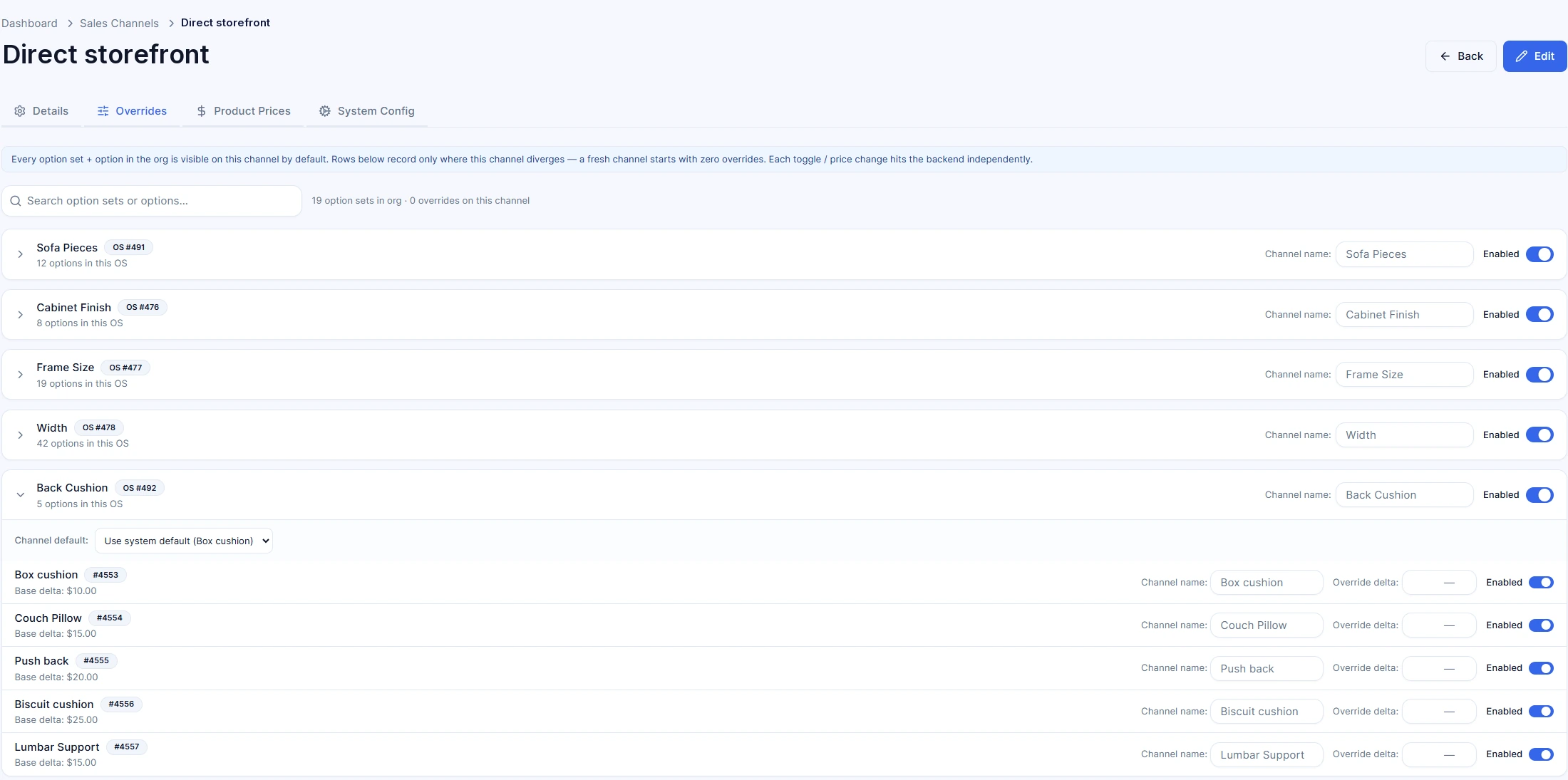
Your website, dealer network and sales portal may sell the same products differently. Sales channels let you manage those differences without duplicating the catalog. A sales channel is one storefront’s view of the same catalog: your own site, a dealer, or a marketplace listing such as Wayfair.
Each channel can expose its assigned products and option sets, apply its own product prices and option defaults, and use a different starting preset, theme and sharing link. Settings that are not overridden fall back to the catalog or system settings.
For example, your direct storefront can open with one starting configuration, while a dealer’s experience opens with another and uses dealer-specific pricing. Both still draw from the same underlying product catalog.
Manage the product centrally. Adapt how it is sold by channel.
Connect the configuration to pricing, quotes and commerce
The configuration should remain useful after the customer finishes exploring it. Live pricing is calculated by the engine, with an itemized breakdown that reflects the configured products and options. That pricing also supports the quote, rather than requiring a separate calculation in the frontend.
The platform supports saved and shared configurations and branded quote PDFs. Developers can access structured configuration and bill-of-materials data, including product identifiers, quantities, selections and engine-calculated prices, to connect the experience to their own systems.
For an embedded configurator, the commerce bridge lets your website read the quote, capture a product image, and retrieve the configuration snapshot for a cart or order workflow. Your integration connects those outputs to your storefront’s checkout, so the configuration can travel with the purchase. Saved projects and quotes require a plan that includes them.
Take the configured product beyond the browser
The platform also supports AR and generated imagery from the configured scene. Customers can open an AR link or scan a QR code to view the configured product at full size in their space. They can also generate product silo and lifestyle images from the current configuration, with generated assets available alongside projects and quotes.
These capabilities extend the same configuration into different ways of viewing and sharing it. Availability and generation allowances depend on the plan.
Build and evaluate for free
You can start building and evaluating a configurator on the free plan. It includes unlimited configurators, products, variants and materials, along with the dashboard, rules and pricing engine, and API access.
Free use is for non-commercial evaluation and includes the imagine.io watermark. A paid plan licenses commercial use, removes the watermark, and unlocks additional capabilities such as sales channels and saved projects with quotes. Current plan details and usage allowances are available in the dashboard.
Start with one product line. Define its options, add its rules and constraints, and test how each choice affects the configuration. Then choose the experience that fits your team: a shared link, an embed, or a custom SDK integration.
Make your catalog configurable in 3D.
Free to build. No card, no sales call.
Published 2026-10-06. ← All posts